

Snapizzi
Administrator
Sorting and organizing thousands of photos after a job can take hours. Snapizzi automates the process so your images go straight into the right ShootProof galleries.
And now, Snapizzi also fully supports ShootProof categories when porting your projects — making volume photography management even easier.
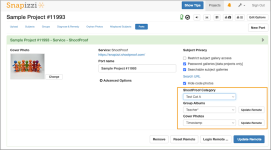
With this update, you can:
ShootProof Category: Choose from the drop-down list of categories you’ve already set up in your ShootProof account. The project will be placed under the category you select.
Group Albums: Decide how subject albums should be grouped (e.g., by Teacher or Grade). Snapizzi will create the grouping automatically when porting.
Cover Photos: Choose how cover photos are assigned for individual subject and group albums:
- Filename → Uses the first photo in each album for each subject
- Timestamp → Uses the earliest photo by capture time for each subject.
- Rating → Uses your highest star-rated image for each subject.
- None → Skip assignment and set cover photos manually in ShootProof later.
We’ve put together a step-by-step guide to show you how it works: Using Snapizzi with ShootProof Categories
We’re excited for you to start using this new feature! More great things are on the way!
Questions? Just drop us a line — we’re happy to help.
Last edited: