Featured content

0:00 Introduction to Snapizzi 0:45 Platform Compatibility 1:35 How Snapizzi Works 2:19 Event Type Project 3:01 Data Type Project 5:13 Dashboard Walkthrough 6:03 Project Setup and Settings 8:33 Get Camera Cards 10:47 Snapizzi Paperless 13:09 CSV Requirements and Star Ratings 15:11 Sharing and Multi-Group Setup 17:14 Studio + Platform Gallery Example 18:31 Repair Tools 21:28 Export Options (Subject Lists, Bundles, Proof Sheets) 23:27 Conclusion
Thread 'Snapizzi Personal Demo for Volume Photography Workflows'
Before founding Snapizzi, I spent 25 years as a high-volume photographer. Today, I help photographers worldwide streamline their workflows and grow their businesses with our innovative automation tools. Snapizzi automates tedious tasks, making it easier to handle large-scale shoots like school portraits, sports teams, and dance recitals. Whether you're managing event photography for schools, sports, or dance, Snapizzi delivers efficient solutions that save time and enhance productivity...
Thread 'New Feature: Snapizzi + ShootProof Categories'
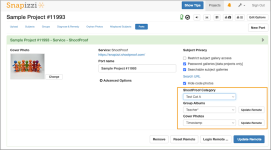
Sorting and organizing thousands of photos after a job can take hours. Snapizzi automates the process so your images go straight into the right ShootProof galleries. And now, Snapizzi also fully supports ShootProof categories when porting your projects — making volume photography management even easier. With this update, you can: ShootProof Category: Choose from the drop-down list of categories you’ve already set up in your ShootProof account. The project will be placed under the...
Back
Top